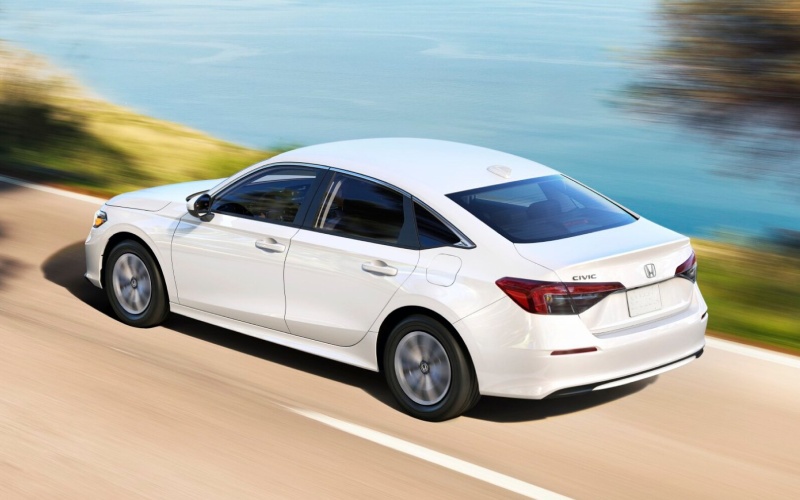
Bob Boyte Honda - Which compact sedan makes daily tech simpler around Jackson, MS — the 2026 Honda Civic Sedan or the 2026 Hyundai ELANTRA?
For many shoppers, the deciding factor between two strong compact sedans comes down to how simple the tech feels on busy weekdays. If you’re comparing these two icons, the core question sounds like this: which one makes navigation, music, and safety alerts feel seamless around Jackson, MS traffic and parking? Below, we dive into the cabin tech experience that separates the Civic and ELANTRA, with a focus on features you’ll use every day.
Built-in navigation and voice control
The Civic’s available Google built-in puts Google Assistant and Google Maps directly into the car’s native interface. You can say “Hey Google, navigate to the Reservoir Overlook,” or “Call Mom,” and the system responds quickly without touching your phone. Maps show lane guidance and live traffic right in the center screen and, on Sport Touring Hybrid, key prompts also appear in the 10.2-inch Digital Instrument Cluster. The ELANTRA offers built-in navigation on upper trims and phone projection on others, but it doesn’t run Google built-in natively; it relies on Hyundai’s system or your smartphone. That difference matters in stop-and-go traffic near the stack interchange because the Civic’s native voice control keeps your hands anchored on the wheel and your attention looking ahead.
Another advantage of the Civic’s native approach: over-the-air updates to Google apps and a familiar voice interface that recognizes natural phrasing. If you’re the designated carpool driver, the result is less time hunting for on-screen buttons and more time focused on what’s happening three cars ahead.
Smartphone integration that stays out of the way
Both cars support Apple CarPlay® and Android Auto™. Where the Civic separates itself is how easy it is to live with wireless projection on upper trims alongside a standard wireless phone charger on Sport Touring Hybrid. That charger is placed where it’s easy to drop the phone and go, so your device stays powered while you rely on either Google built-in or your preferred phone apps. The ELANTRA also offers wireless smartphone integration on its 8-inch system and wireless charging on upper trims, so you’re covered there too. The distinction comes from how cohesively the Civic blends Google built-in with those wireless options, so you don’t feel like you must choose between using the car’s native brain or your phone—both just work.
Driver information with less distraction
In the Civic, critical details live in a clean 10.2-inch Digital Instrument Cluster on Sport Touring Hybrid. Turn-by-turn prompts, adaptive cruise status, lane-keeping cues, and audio info are grouped logically and rendered with crisp fonts. That clarity reduces glances and helps you take in information faster while merging onto I-55 or easing through a tight downtown street. ELANTRA counters with available dual 10.25-inch screens that look high-end and carry plenty of information. Plenty of drivers love the Hyundai layout; it’s handsome and feature-rich. If you prefer a cluster that feels purpose-built around driving with minimal clutter, the Civic’s layout leans in your favor.
Audio and everyday ergonomics
Audio fans will appreciate that both cars offer a premium system—Bose Premium Sound System is available on each. In the Civic, the tuning is crisp and balanced, and the cabin’s airy design helps the soundstage breathe. What owners tell us stands out, though, is the Civic’s physical controls for volume and temperature and the way the honeycomb dash keeps vents out of sight yet easy to aim. It’s a small thing that becomes a big thing when the sun hits the windshield on Lakeland Drive and you want quick, precise airflow adjustments without menu-diving. ELANTRA offers an undeniably sleek interior with high-tech visuals; the Civic leans toward tactile simplicity that earns its keep every single morning.
Both sedans also make parking and lane changes easier with their respective blind-spot and cross-traffic systems. The Civic’s blind spot information system with cross traffic monitor is standard on Sport and above, with clear indicators in the mirrors and screen. ELANTRA’s Blind-Spot Collision Warning and Rear Cross-Traffic Collision-Avoidance Assist provide similar coverage. For highway drives, Honda Sensing® and Hyundai SmartSense both deliver thoughtful assistance; the Civic’s Traffic Jam Assist and consistent tuning across trims help it feel predictably supportive in the messy middle of rush hour.
If you’re deep in research mode, you might be wondering how each cabin tech suite performs as systems evolve and your phone changes. That’s where the Civic’s native Google built-in offers longer-term peace of mind: navigation, voice, and apps update over time, and the car’s interfaces remain familiar even as phone operating systems shift. The ELANTRA remains a compelling option with robust features, especially if you stick to your preferred phone projection; just know that your experience is more dependent on the phone you connect.
What most shoppers want to know first
To help you decide quickly, here’s a quick rundown of the tech questions we’re asked most often—and what the answers mean for real life on Jackson streets.
- Native navigation vs. phone projection: Civic’s Google built-in means Maps and Assistant are part of the car; ELANTRA relies on its system or your phone.
- Voice control speed and accuracy: Civic’s Google Assistant tends to understand natural phrasing and responds quickly, minimizing eyes-off-road time.
- Screen clarity and layout: Civic places key prompts in the cluster and center screen with simple menus; ELANTRA’s dual-display look is sleek but more app-forward.
- Charging and cable clutter: Both offer wireless phone charging and projection on select trims; Civic’s integration with Google built-in reduces the need to plug in at all.
- Driver-assist consistency: Both cars offer robust suites; Civic’s tuning and feature consistency across trims make it easy to trust from your very first drive.
Frequently Asked Questions:
Does the Civic’s Google built-in replace Apple CarPlay® and Android Auto™?
No—think of it as an additional native option. You can use Google built-in for navigation and voice or switch to Apple CarPlay® or Android Auto™ anytime.
Can the ELANTRA mirror most of this functionality with smartphone projection?
Yes, ELANTRA supports phone projection widely. The difference is that the Civic can do navigation and voice tasks natively without relying on your phone’s apps.
Is premium audio available on both?
Yes, both offer a Bose Premium Sound System on upper trims with detailed, room-filling sound.
How do these tech differences feel in daily driving?
In short, simpler. The Civic’s native Google built-in reduces tapping and menu scrolling, especially useful in start-stop traffic and complex intersections.
When you’re ready to compare these systems side by side, Bob Boyte Honda is serving Jackson, Madison, and Flowood with test drives tailored to everyday routes. If your goal is effortless tech that stays out of the way, the Civic’s native Google built-in, clean driver displays, and cohesive controls deliver the smoother daily routine most shoppers want.